Verizon Wireless drops Chaperone for Family Locator

Verizon Wireless has mothballed their Chaperone service and has replaced it with Verizon Family Locator. The new service is now not only easier to get, but there are increased options for smartphones and an improved web interface for the service. Family Locator allows subscribers the ability to keep track of family members through the use of GPS technology.
The Family Locator service can now be added to a subscription by simply signing up online. There is no longer any need to visit a store or to contact customer service. Users can simply run through an Activation Wizard to get signed up.
Another nice feature of the service is that the locator, not the locatee, can now use nearly any Verizon Wireless smartphone. Some Family Locator features can even be accessed through a Web browser so that profiles can be changed or family members can be located. Speaking of locating family members, the new Family Locator Web allows locations to be seen in a 3-D bird eye’s view. The website will also provide the nearest address to the location of loved ones.
The Family Locator service is available to Verizon Wireless subscribers for US$10 a month. Current Chaperone users can continue to use their Parent and Child applications. All current settings will be saved for use with Family Locator.
Read more from the Verizon Wireless press release
Brian’s Opinion
With some of the crazy news reports you see these days it’s no wonder there is a growing desire by parents to stay in touch. That’s the reason behind services like Verizon Wireless’ Family Locator. Ok, there’s the crazy teenager who always gets in trouble and who is late coming home on Friday nights that makes the service useful as well.
I’m glad to see Verizon Wireless improve the Chaperone service. I must admit I wasn’t a big fan of it. I mean, it did what it was supposed to do, but didn’t really offer any additional extras that made it worthwhile. I think Family Locator might change that.
Probably the most significant change is that you can access location information from the web browser of just about any Verizon Wireless smartphone. That’s nice, because it sucked to have to pick a phone compatible with the Chaperone service when you only needed the service to track another phone. The 3-D bird’s eye view of locations online is also a nice little addition which makes Family Locator a great replacement for the Chaperone service.
Opera launches Opera Mini 5 beta
 On the heals of their latest browser for the PC, Opera 10, the folks of Opera Software have released the latest beta of their browser for mobile phones called Opera Mini 5. Opera Mini boasts improved speed over other mobile browsers and less bandwidth over cellular networks since data sent to mobile phones can be compressed up to 90 percent. As Opera puts it users, “can get more Web out of each megabyte”.

Opera Mini 5 is an appropriate name since the company boasts five feautres with the latest version of the mobile browser. The first feature is a new, sleek interface while mobile phone users will also like the fact that the browser adapts to your phone for browsing whether you have a touchscreen or a keypad. Other features include Speed Dial, which allows you to choose from a table of contents of favorite sites, and a built-in password manager. The fifth and coolest feature has got to be the addition of tabbed browsing. Yes, tabbed browing has finally made its way to mobile.
Opera Mini 5 beta is available from the Opera Mini website and can be downloaded for free from your phone’s existing web browser. Though phone support may vary while the browser is in beta, a special version of the browser is available for the BlackBerry which allows for seemless opening of links and copy-and-paste funtions.
Read more at the Opera press release.
Brian’s Opinion
First, let me say that I’m a long time fan of the Opera Mini browser. I downloaded it for use on my BlackBerry and tend to use it over the built-in BlackBerry browser. I will admit the BlackBerry browser has improved over time, but Opera Mini is still light years ahead of it.
The secret of Opera Mini’s success is the technology that allows Opera to cache websites and compress what is sent back to a mobile phone when requesting a website. Not only is this attractive to users because of performance improvements, but to carriers as well since it means less bandwidth use on their networks. I haven’t even begun to talk about some of the great enhancements to the browser such as the introduction of tabbed browsing or Speed Dial.
Personally, I haven’t found many mobile browsers which come close to Opera Mini’s capabilities. Okay, I admit that the mobile version of Safari is still way out there, but you need to have an iPhone if you want to use it. Opera Mini is compatible with a number of platforms which allows it to have a greater footprint. That’s another incentive for carriers to support the use of Opera Mini.
Resco Explorer 2009 for Palm OS
 | |||||||||||||||||||
 |  |  |  |  |  | | |||||||||||||
| | | ||||||||||||||
| | | ||||||||||||||
One of the best features of the Explorer is its customizability. The users may choose between one- or two-panel modes, horizontal or vertical layout and setup other display aspects. Note also the possibility of the one-handed control and the support of all common devices and resolutions. Since v4.10 Explorer supports Firefox-like Tabs and touch scrolling.
Classic version is available as a separate zip installer. Note the reduced fuctionality caused by the Classic/PRE limitations. See the readme file in the zip installer for the details.
Features:
- Explorer provides a comfortable way for all file operations you may think off - copy, move, delete, rename, beam, etc.
- You may use drag&drop, copy&paste, multi-selection, touch scrolling, tabs, favorites, RAM/card conversions, sorting, searching and filtering, various viewers and editors.
- Explorer 2009 can synchronise folders (even over the network) and perform card check (chkdsk).
- Zipper is transparently integrated into the Explorer. A zip archive works just like a folder. You can manipulate its contents, view compressed images etc.
- Zipper offers also password-based encryption and even secure (AES) encryption.
- Explorer 2009 supports also tar/bzip2 archives. bzip2 plugin is included in the zip installer.
- Explorer works like classic launcher, but can also launch zipped applications and documents - images, eBooks, doc/xls files...
- Secure document storage safely stores your files and provides easy interface for their launching.
- A simple jpg/bmp/gif viewer (supporting most Palm cameras) displays even zipped images and image resources embedded in the Palm OS databases.
- Explorer has a good text editor. Text files can be created, edited, beamed, hotsynced etc.
- Manual backup: Explorer offers a multi-backup solution with fast compression, incremental backup, encryption, sorting and filtering and with open zip format. Unique feature is the backup verification.
- Explorer contains editors of the preferences, file associations or alarms and provides access to other system internals.
- RAM Analyzer: Explorer offers structured folder view of the RAM with the databases sorted into reasonably defined folders. Ideal for PDA cleaning.
- Explorer supports LAN/Bluetooth networks and FTP. In all cases Explorer presents remote resources just like another card. (No need to learn anything!)
- Explorer serves as an ideal front-end for VPN clients.
- FTP starters may use free FTP account at the DriveHQ hosting service.
- Do you want to listen an mp3 located on a Nokia phone? (View an image, copy a file...) Just use Explorer Bluetooth browser.
- Network panel contains low-level tcp commands (ping, tracert) and the time synchronization with World time servers.
- -:-
- NEWS FOR EXPLORER 2009
- Enhanced text editor (unlimited size, word wrapping)
- Extended FTP support
- Folder synchronization
- Card check (chkdsk)
- Support for tar/tar.gz/bzip2 archives
- Check of the zip integrity
- -:-
- NEWS FOR v5.03
- Possibility to switch off storing FTP password
- Small fixes - mp3, pdb files in zip, file attributes, keys setup, scan card etc.
- Zip installer includes special release for the Palm PRE Classic emulator
Minimum Requirements:
- Palm OS 5.0 or higher
Display Dimensions
160 x 160, 160 x 240, 320 x 320, 320 x 480, 480 x 320
Operating System
Palm OS 5, Works on Classic
download it from the following link
http://resco-file-explorer.en.softonic.com/palm/download-version/resco-explorer-2009-5.02.2
Windows Live Messenger/Mail V1.1.861 for Nokia S60v3 With WL Spaces


Install dep.sisx first then the client. After that you can install Windows Live Spaces plugin (optional).
Download OS 9.1 for N73, N80 etc
Download OS 9.2 for N95 etc
DOWNLOAD:
dep for os 9.1.zip
ShareOnline_MSN_Localised_S6030 for os 9.1.zip
WindowsLive_S60_3_0_v_1_0_8161_signed for os 9.1.zip
dep for os 9.2.zip
ShareOnline_MSN_Localised_S6031 for os 9.2.zip
WindowsLive_S60_3_1_v_1_1_8161_signed for os 9.2.zip
MDictionary v6.8 S60v3 SymbianOS9.x Signed


Simple dictionary program for Symbian cellular phones
The Dictionaries (you will download from here) :
English - Chinese
English - German
English - Hungarian
English - Serbian
English - Spanish
English - Croatian
French - Hungarian
German - Hungarian
Italian - Hungarian
Japanese - English
Japanese Font
Chinese Font
English - Dutch
English - Finnish
English - French
English - Italian
Swedish - English
Compatible Phones :
Nokia N96-3, Nokia N79, Nokia N85, Nokia E63,
Nokia 5320 XpressMusic, Nokia 6650, Nokia E71, Nokia E66,
Nokia 6210 Navigator, Nokia N96, Nokia 6220 Classic, Nokia N78,
Nokia 6124 Classic, Nokia N82, Nokia N95-3 NAM, Nokia 6121 Classic, Nokia 6120 Classic,
Nokia 6290, Nokia N95, Nokia N75, Nokia N91, Nokia E62, Nokia E50, Nokia 5500, Nokia N93, Nokia N93i,
Nokia N73, Nokia N71, Nokia N80, Nokia N92, Nokia E70, Nokia E60, Nokia E61, Nokia E61i, Nokia 3250,
Nokia N91, Nokia 6120, Nokia 5700, Nokia N77, Nokia E65, Nokia 6110, Nokia E90, Nokia N76, Nokia 6290,
Nokia E51, Nokia N95 8Gb, Nokia N81, Nokia N81 8Gb
Samsung i520, LG Joy, Sony Ericsson W960
DOWNLOAD:
http://rapidshare.com/files/250081139/MDictionary_S60_3rd_v6.8.rar
Foice 2.0

Foice by Peter Kishalov allows you to record your voice and change its pitch, to create funny “baby” or “monster” effect.
You also can save the sounds as ringtones, if you manage to activate the feature… Note: A free feature unlock code can be found here.

Mobiola Photo Renamer For Blackberrya
Mobiola Photo Renamer is a easy to use renaming utility for blackberry that can automatically replace disappointing “IMG000XX” with easy to read custom file names when taking photos on your BlackBerry
Features
- “Ask me before renaming” option every time you make a photo. Otherwise Mobiola® Photo Renamer does it automatically.
- Easy to understand names for your photos. A new name looks like Prefix + Date + Suffix + Ordinal Number.
- The app works on the newest BlackBerries like 8900, Bold, touch-screen Storm etc.
- You can choose the format of date by yourself.
For Blackberry Curve, 8900, Bold etc

For blackberry storm
Blackberry Video Converter 1.13
Blackberry Video Converter by Seabyrd Technologies is a Simple yet powerful utility to put video on Blackberry devices. The Blackberry Video Converter works with: Blackberry 8800, Bold and Pearl 8100.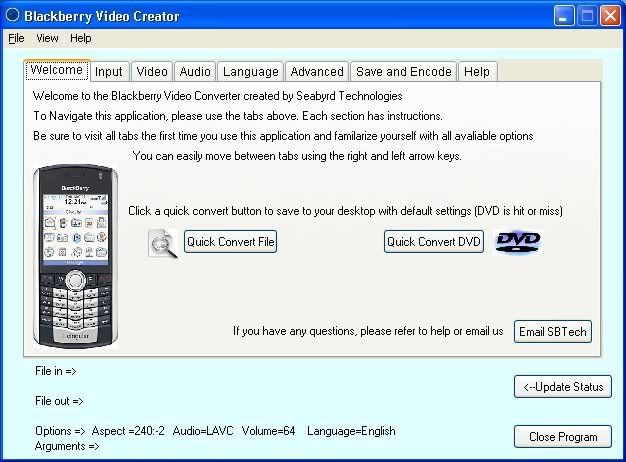
The Blackberry Video Converter uses the mencoder engine and supports many forms of video.
Features
- Simple yet powerful
- One-click quick convert feature
- Supports many types of video
- Supports DVD (.vob)
- Easily choose aspect ratio
- Easily adjust volume
- Can use all available languages
- Ability to pass custom arguments
- Price (free)
DownloadThe Blackberry Video Converter doesn’t work with the Pearl 8120 or 8130 and MOST Curves.

Spy call

Spy Call is an automated conversation recording program designed for the Nokia Series 60 platform*. Spy Call detects all incoming/outgoing calls and automatically prompts you to save the conversation or not. Spy Call offers one touch recording, and requires no sound recorder program launching from the menu, no long keypress, no unnecessary effort. Spy Call is the most ergonomic application of its kind!
Spy Call - Knows the moment when you need it! Do you?
Feature list of Spy Call:
# Record and save conversation from incoming/outgoing calls
# Detailed information about the saved clip (caller name/number, time, duration, etc.)
# Ability to playback clips locally
# Support of AMR and WAV audio file formats **
# Send the saved clips via Infrared/Bluetooth/Multimedia
# Automatic startup on phone power on
# Memory Card support
** - WAV files are more suitable when you want to transfer the saved clip to a PC, since you do not have to install third party Players to play AMR audio files. WAV files are native to the Microsoft Widows operating system. WAV files are saved using IMA-ADPCM compression, the file size is 3 times higher than AMR fiels on average, however they do have better overall sound quality.
Requirements:
Installation requires about 50 Kb of the free space on the device.
Working On:
Nokia 3230 , 6260, 6600, 6620, 6630, 6670, 6680, 6681, 6682, 7610 , N70
Tips:
“SpyCall1.2_Full_For_S60v2″ File is Latest Version. May be it’s not working on Nokia 6600. So Try “SpyCall1.2_Full_For_S60v2″ . If You Feel Beep. Install Beep Off File.
Register With ” 0 ”

Call Recorder

Nokia 3230, 3620, 3650, 3660, 6260, 6600, 6620, 6630, 6670, 6680, 6681, 6682, 7610, N-gage, N70, N90....
Links and References to Other Pages:

Call Recorder for N70 Music adition no beep
its realy works first run and hide the beep off app and then run the call recorder.
Download Link:-
terasightprorecorder2007v100s60.zip
beepoff_302_cracked_by_3g365.zip

Record voice memo or phone calls anytime by simply pressing hotkeys. Phone calls can be recorded automatically. You can choose to have BEEP or NO BEEP for call recordings.This application satisfies all your recording needs. It will let you record a voice memo or phone call anytime by simply pressing hotkeys of your own choices. Phone calls can also be recorded automatically based on your choices. You can browse, label, delete and transfer all the recorded memo and phone calls with ease. You can record arbitrarily long memo or conversations. The application will automatically stop recording once the storage space is low on your phone and never will fill up your phone! Hotkeys work anytime, always! Free upgrades of future versions!
The application is a Symbian Signed application backed by the industrial standard Quality Assurance testing procedure.
Major Features:
* Customizable hotkeys to record, play, pause and stop
* Or simply press abc/pen key three times to start/stop recording.
* Or simply press PPT key three times to start/stop recording.
* Or press Up Arrow key/record button three times rapidly to start/stop recording on Nokia E61 and the similar phones with full keyboard.
* No beep recording of phone calls! You can choose to have the beep on or off. Demo version only allows 5 minutes of no-beep call recording. Please be aware that this feature may not work on all firmware versions of phones including Nokia E50 and 5500.
* Support recording in both AMR and WAV formats
* Support recording to phone memory or directly to memory card.
* Optional automatic recording of phone calls
Adjustable maximum recording length. Demo version does not allow the change of recording length.
* Password protected playback
* Operate in background mode or/and user interactive mode
* Configurable storage locations
* Automatic startup upon phone power on. You can enable/disable this through the application settings. This feature is DISABLED by default!
* Automatic restarting an interrupted recording, for example, by an incoming call.
* Ask for your permission before saving a recorded clip if you like.
* Always ready to accept hotkeys
* Easy to manage/browse the details of all recorded clips such as caller id, duration, timestamp.
* Automatic stop recording at low storage space
* Send the recorded clips to other phones or PC via Bluetooth, Infrared, MMS or email
(email service is required for this feature)
* Support sending multiple clips together.
* Support automatic deletion of the clips after they are sent.
* Easy to retrieve the recorded voice clips using Nokia PC suite.
Known Issues:
* Sending recorded clips via email is not supported in this version.
* Compatibility issues with Nokia 5500 and Nokia E50. For these two models of phones, phone calls can be recorded with “Beep” on. (press options->Settings, and turn on “Warning beep”.)
* For N93 , the beep will be removed only with manual recording of calls using pen/abc key.
Compatible Devices:
Nokia 3250
Nokia E60
Nokia E61
Nokia E62
Nokia E70
Nokia N71
Nokia N73
Nokia N80
Nokia N91
Nokia N92
Nokia N93

Secure SMS Free

UniSoft’s Secure SMS is an innovative end to end security, with a unique set of Security features : * Anti-Replay, so that messages captured and re-sent by an attacker are invalid. * Strong Identity, so that the receiver has confidence of the message origination. * Privacy, through message encryption. * Message integrity, so that message content change is detectable. * Compression, so that larger messages take less number of sms messages to send. Secure SMS is a Peer to Peer application for mobile phones with Java support (MIDP 2, CLDC 1.0), and is based on Unisoft’s Secure Transaction SDK. Both the sender and receiver of the Secure SMS messages needs to have the application installed.
Nokia’s Symbian S60 3rd edition based mobile phones:
3250, 5300, 5320 XM, 5700, 5700 XM, 6110, 6120c, 6121c, 6124c, 6210, 6220c, 6290, 6650, E50, E51, E60, E61, E61i, E62, E63, E66, E70, E71, E90, ,N70, N71, N73, N75, N76, N77, N78, N79, N81, N81 8GB, N82, N85, N90, N91, N92, N93, N93i, N95, N95, N95 8GB, N96

Super Bluetooth hack 2009

This is a new version of Super Bluetooth Hack for conventional and mobile-based simbian. If you do not know what a Super Bluetooth Hack, this program through you can manage other people’s mobile phone at a distance (10-15 meters, it’s blyutuz)
What can …
1) Read SMS
2) disable telenfon
3) Vklyucht music
4) Choose modes (normal, without sound …)
5) Block phone
And much much more
Extras. information.
Installation:
1) Download to PC.
2) Pour on the mobile
3) Run the Installer (what you download, incidentally need JAVA)
4) He finds it and you will be able to run progammu
5) Select the language and polazit configured
6) Click Connection
7) Click search devices Choose the “victim”
9) AND MANAGE!
Nokia’s Symbian S60 3rd and S60 5th edition based mobile phones: 3250, 5300, 5320 XM, 5700, 5700 XM, 5800 XM (Tube), 6110, 6120c, 6121c, 6124c, 6210, 6220c, 6290, 6650, E50, E51, E60, E61, E61i, E62, E63, E66, E70, E71, E90, ,N70, N71, N73, N75, N76, N77, N78, N79, N81, N81 8GB, N82, N85, N90, N91, N92, N93, N93i, N95, N95, N95 8GB, N96, N97.

Power MP3

PowerMP3 will turn your S60v3, s60v5 Smartphone into powerful MP3, OGG, AAC and M4A player.
PowerMP3 is a revolutionary audio/music player for nokia series 60 smartphone. It is designed using pluggable architecture for the possibility of extending the player with new audio file formats when the need arises. The current version of PowerMP3 supports MP3, OGG, AAC and M4A formats.
Features:
-Play mp3,OGG, AAC and M4A audio file formats
-Create custom Playlists to organize your music
-Support of M3U format for playlists
-High quality Different Skins
-10-Band Graphical Equalizer for all kind of music
-Graphical Spectrum analyzer
-Adjust the Balance while song playing
-Background Playback
-PowerMP3 resumes playback after incoming or outgoing calls
-Set the playing position with Fast forward and Fast rewinding
-Powerful Equalizer presets management with Auto mode
-Easy “Update My Music”
-Sleep timer
-Random play
-Repeat song or all songs
-Downloadable skins
-Lock keys
In new version:
-Fixed a lot of bugs
-New volume control
-New EQ
Nokia 58000, N97

Skye Text

Do you want to add some excitement to your SMS/Text messaging?
SkyeText allows you to add rich colour graphics to your SMS messaging!
Easy to use: SkyeText will automatically change all regular SMS text emotions received and sent to a rich graphic format. These graphic emoticons are displayed within the SMS message.
SkyeText will only work on handsets that have the SkyeText application installed. See the examples below:
Example #1 – SMS to a friend with SkyeText installed:
* User A (A): has SkyeText installed.
* User B (B): has SkyeText installed.
* A sends an SMS to B.
* While A is typing the SMS message, SkyeText emoticons can be added into the message. The emoticons will show as rich graphics on A’s device while creating the SMS.
* B will receive the message from A as an SMS with rich graphics included in the message.
* If B replies to A, he/she can insert rich graphics while creating the SMS.
* A will receive the message from B. All emotion key combinations used by B will be displayed as SkyeText emoticons.
Example #2 – SMS to a friend without SkyeText installed:
* Same as above, except B does not have SkyeText installed.
* A: user experience the same as in Example #1 (above)
* B: Because B does not have SkyeText installed, B will receive messages from A as a regular SMS message. No graphics will show. All emoticons used by A will be shown as traditional SMS emotions e.g.
Note : First U Need To Hack Your Phone…
Nokia’s Symbian S60 3rd edition based mobile phones:
3250, 5300, 5320 XM, 5700, 5700 XM, 6110, 6120c, 6121c, 6124c, 6210, 6220c, 6290, 6650, E50, E51, E60, E61, E61i, E62, E63, E66, E70, E71, E90, ,N70, N71, N73, N75, N76, N77, N78, N79, N81, N81 8GB, N82, N85, N90, N91, N92, N93, N93i, N95, N95, N95 8GB

smartmovie 4.01


Software Details Software Description:
1, the horizontal support full-screen video, so that the
2, support for plug-in subtitles, this version of the plug-in support for subtitles excellent,
3, smooth playback, high-quality video without cottonwood, support MP4, FLV and 3GP video decoding, support for up to 30 FPS!
4, the use of PC side of the conversion process, the realization of other formats to
5, support for
6, support shortcut key operation, is very convenient, including the volume, jump, fast forward / rewind, full screen, broadcast mode switching shortcut keys have to be quick operation.
7, support brightness adjustment, mandatory vertical horizontal playback, subtitle on / off and other personalized settings.Procedures for the design of a very humane, this point must be mentioned, we used to use to understand.
8, support continuous playback, repeat playback mode, support for right-hand mode, more convenient hand-held video, and watch soap operas and more convenient.
9, support Chinese file name (see Figure 3).
10, fast-forward to support the thumbnails --- would like to fast-forward to what place, at a glance (see Figure 3).
11, supporting documents thumbnails to find files, at a glance (see Figure 4 a good Figure 6).
smartmovie 4.01 + ***** + finished three software patches to install after the end of the two icons will appear not to open smartmovie icon 4.01 ***** it open so that the icon can be assured that the use of mind and finished the installation of intelligent cinema fixes the order in which they are wrong if you open immediately withdraw from the
I believe everyone knows that smart 4.01 theater can play FLV, AVI, MP4, 3GP, however depressing it is that there is no formal break is only a temporary version of this annex will look